These Visual Studio projects utilize the developer version of CMarkup, and they contain a treasure trove of useful C++ MFC source code including reusable classes encapsulating editing, printing, sockets, buffers, markup viewing, animation, message nodes, and dialog threads.
This is not a typical component package because it is the entire source code for these freeware programs. All of these features are demonstrated in action, allowing you to learn by example which is perhaps the deepest, most reliable kind of documentation. A few of the classes are lightly documented (follow the links below), but may change slightly from release to release within reason.
The carefully designed classes and project architectures are meant to be small, compact and easy to understand with descriptive names and straight to the point implementation to match expectations of Visual Studio developers. Code snippets and pseudo code are provided below to give a sense of what is involved.
Any one of the major classes and feature points in the Advanced CMarkup Developer sources represents fifty to as many as several hundred hours of development as well as reuse and testing in various scenarios. So it is a worthwhile purchase for any one of the following features.
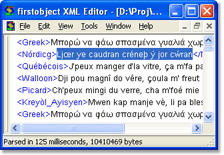
1. CDataEdit a large text edit control. This is a CWnd derived class with no other dependencies. It demonstrates high-performing and efficient editing, syntax coloring, and printing. In a non-Unicode build it uses UTF-8 and converts to wide char for Win32 APIs on the fly.
CDataEdit m_edit;

// OnCreate
if ( ! m_edit.Create( this, IDC_EDIT_EG ) )
	return -1;
m_edit.SetWordWrap( false );
| |  |
| |
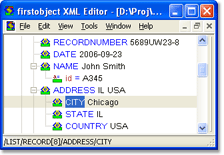
2. CMarkupTreeCtrl a virtual tree control. This is a class that is derived from CWnd (not utilizing Windows treeview or listview common controls). It displays a tree based on the contents of a CMarkup object, and is very light because it contains no data of its own (thus "virtual"). All the code is here for handling Windows messages drawing the tree from scratch.
CMarkupEditorTreeCtrl m_tree;
CImageList m_ilTree;

// OnCreate
if ( ! m_tree.Create( this, IDC_TREE_EG ) )
  return -1;
m_ilTree.Create( IDB_IL_TREE,
  16, 0, RGB(255,255,255) );
m_tree.SetImageList( &m_ilTree );
| |  |
| |
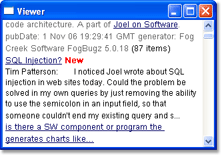
3. CMudCtrl an HTML-like control. This is a CWnd derived class that takes a markup text string and displays it. It is easy to put formatted text on a dialog surface, and have hyperlinks with specialized attributes.
<B>Title</B>

<I>Please</I> <A href="home.htm" flags="56">click</A>.
| |  |
| |
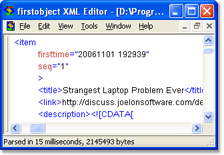
4. XML formatting. Use the code supplied in CMarkupEditorView::Beautify to develop your own specialized XML aligning and indenting. This function has options for the indent and the placement of attributes and demonstrates an efficient mechanism for append-based creation of a large document.
// Start tag
csTagName = xml.GetTagName();
SmartAppend( csNew, nNewBufLen,
  CString("<"+csTagName) );
nAttr = 0;
while ( ! (csAttr=
    xml.GetAttribName(nAttr++)).IsEmpty() )
{
  xml.GetAttribOffsets( csAttr,
    &nStart, &nLen );
  ...
| |  |
| |
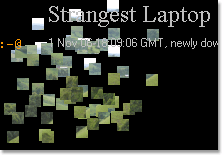
5. CAnimationEngine class to move and transform text and images. This class makes animation easy by managing a cache of animation items which can be added by setting simple properties.
CAnimationEngine m_ae;
GetClientRect( &m_rect );
CPaintDC dc( this );
m_ae.SetScreen( dc, m_rect );
CAnimationItem* pItemCake = NULL;
pItemCake = &m_ae.CreateItem( csLetter );
pItemCake->SetFont( "36,Verdana" );
pItemCake->FadeOut();
pItemCake->SetStart( m_ae.RandPt(90) );
pItemCake->SetFrames( 300 );
| |  |
| |
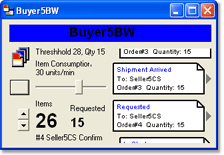
6. CMessageNode class to queue, send and receive messages. This multithreaded class implements a single instance TCP/IP listener (using the CSock class) peer to communicate with other instances on other machines. Applications access the CMessageNode via the CNodeHandler class which locates or starts the machine's single instance node.
// Main service
CNodeHandler m_nodehandler;
m_nodehandler.StartNode( csNodeName );
CString csLoc = m_nodehandler.GetLoc();

// Monitor
CNodeHandler m_nodehandler;
m_nodehandler.Attach();
m_nodehandler.NotifyMonitor( m_hWnd );
m_nodehandler.GetAppList( xml );

// Client application
CNodeHandler m_nodehandler;
m_nodehandler.Attach();
m_nodehandler.Register( csAppID );
while ( m_nodehandler.Retrieve(&xmlMsg) )
{
  csStatus = xmlMsg.FindGetData(
      "/*/Payload/Status" );
  ...
| |  |
| |
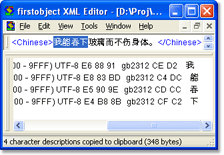
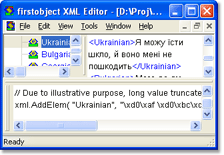
7. Character set encoding functions. The firstobject XML editor contains code to enumerate system supported encodings and display Unicode and ANSI encoding information on characters.
| |  |
| |
8. CGripperBar an MDI docking bar control. This is a CControlBar derived class that manages docking locations of multiple gripper bars. Unlike other implementations this is better modularized to return position state as a string rather than trying to write to the registry or a configuration file for you. It demonstrates the drawing of the control bar edges in the same style as the CDividerCtrl also included in the firstobject XML Editor project.
// MainFrame::OnCreate
if ( ! m_wndOutBar.Create(
    _T("OutBar"),this,ID_BAR_EG) )
{
	TRACE0("Failed to create output bar\n");
	return -1;
}
EnableDocking( CBRS_ALIGN_ANY );
m_wndOutBar.EnableDocking( CBRS_ALIGN_ANY );
ShowControlBar( &m_wndOutBar, FALSE, FALSE );
DockControlBar( &m_wndOutBar,
  AFX_IDW_DOCKBAR_BOTTOM );
UINT nDockState =
  m_wndOutBar.SetPosState(csState);
if ( nDockState
    && nDockState != AFX_IDW_DOCKBAR_FLOAT )
  DockControlBar( &m_wndOutBar, nDockState );
| |  |
| |
9. CFoalProgram a complete virtual machine, compiler and debugger class. This class houses the standalone FOAL implementation (see the firstobject Access Language), complete with tokenizing, byte code compiling, running and debugging program interface. It is light weight and fast, with no need for separate libraries and all the dependencies and complexities of most language implementations. This includes all of the non-GUI features of FOAL (as seen in the firstobject XML Editor) all inside one FoalProgram.cpp/.h pair of files! You can use this to easily add your own custom scripting and configurability to your product.
| | |
| |
10. CBuffer a binary handling class. This class has thread-safe reference copying so that you can efficiently assign CBuffer values and pass arguments by value. Binary data is made easier with these methods for assigning, appending, and returning a hex string.
CBuffer buf1;
buf1.Set( pRaw, nRawSize );
CBuffer buf2( buf1 );
buf2 = "JKL";
CString csHex = buf2.GetViewable(); // "4A4B4C"
| | |
| |
11. A CMarkup object as a multi-thread data repository. The firstobject News Reader uses CMarkup as a feed repository which is accessed by dialog threads, download threads, and even the screen saver thread. The application also demonstrates a single instance implementation that works whether the News Reader is started up by Windows as a screen saver, screen saver settings dialog, or by the user as the News Reader. In all cases the integrity of the single data repository is maintained.
| | |
| |