
The source code for CMudCtrl comes in the firstobject News Reader with the Advanced CMarkup Developer License.
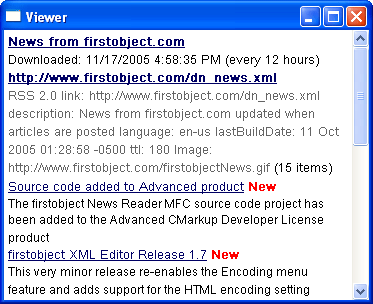
The CMudCtrl class is a standalone MFC control derived directly from CWnd for displaying markup enhanced UTF-8 text similar to an HTML control. Mud stands for MarkUp Draw, and it utilizes a specialized simple markup language designed for this control called MUDML. The CMudCtrl class is used in the firstobject News Reader to render all the views of the feeds from the lists to the yellow notification window to the XML dump shown in the Modify dialog. It uses word-wrap and has a vertical scroll bar when the content reaches past the bottom.
|
|
The source code for CMudCtrl comes in the firstobject News Reader with the Advanced CMarkup Developer License. |
To use CMudCtrl in your Visual Studio MFC project, just add MudCtrl.cpp and MudCtrl.h. Put a CMudCtrl member variable in a parent window class such as a dialog or view and create it with its Create method.
Call the SetContent( CString csContent, BOOL bResetTop = TRUE ) method to populate the control. You can specify plain text as the content and unlike HTML it will honor carriage returns and linefeeds. You can also add hyperlinks and text formatting anywhere in the content. Pass FALSE for bResetTop if you want to refresh without scrolling back to the top of the page. There are also public members for setting margins and background color.
The markup used in the content of the CMudCtrl class is called MUDML (MarkUp Draw Markup Language). It is designed to be so simple as to need little explanation. First of all, whitespace and newline characters are significant; there are no paragraph tags or break tags like HTML. But it supports the following tags much like HTML:
| Bold | <B>Bold</B> | |
| Italic | <I>Italic</I> | |
| Underline | <U>Underline</U> | |
| Color | <FONT color="255,255,255">Color</FONT> | |
| Hyperlink | <A>Hyperlink</A> |
To combine formatting tags, make sure they are properly nested. In other words, if the U start tag is after the B start tag, then the U end tag must come before the B end tag.
BoldUnderline <B><U>BoldUnderline</U></B>
It also supports about 250 common HTML character entities like © © and Ñ Ñ.
A central feature of MUDML is the ability to specify any attributes in a hyperlink because all of the attributes are passed to the event handler for the hyperlink. For example:
<A href="http://example.com" handling="zoom" option="6">Example</A>
It does not even need an href attribute because the event handler can perform any action. So a hyperlink is like a generic button on the CMudCtrl; it does not have to navigate somewhere, it might just change the settings in the view and refresh. This gives the programmer complete flexibility to specify all the details of the action in his own way in the attributes. For example, in the News Reader there is a different context menu for different hyperlinks, and some hyperlinks launch a browser while others navigate within the control to different content.
In your parent window class, set up an OnMudNotify event handler as a normal Windows message handler.
ON_MESSAGE(CMudCtrl::m_WM_MUDNOTIFY, OnMudNotify)
The following example is adapted from the News Reader. Here is an example hyperlink in the MUDML source, and in the example event handler below you can see how the special attributes are used.
<A feedid="4" type="ViewAll" newcount="2">News from firstobject.com</A>
The wParam contains the windows handle of the CMudCtrl child control. The CMudCtrl::CMudNMHDR structure provides the action code and hyperlink. pNMHDR->code is either NM_RCLICK for right-click or NM_CLICK for click. The hyperlink information is received as an XML subdocument string in pNMHDR->csElement so you can grab the attribute values easily using CMarkup.
LRESULT CNewsDlg::OnMudNotify( WPARAM wParam, LPARAM lParam )
{
  // Get child window handle and hyperlink details from params
  HWND hWnd = HWND(wParam);
  CMudCtrl::CMudNMHDR* pNMHDR = (CMudCtrl::CMudNMHDR*)lParam;
  CMarkup xml( pNMHDR->csElement );
  xml.FindElem();

  // Perform action code
  if ( pNMHDR->code == NM_RCLICK )
  {
    // Determine details straight from MUDML hyperlink XML subdocument
    CString csType = xml.GetAttrib( "type" );
    int nNewCount = atoi(xml.GetAttrib( "newcount" ) );
    int nUnviewed = atoi(xml.GetAttrib( "unviewed" ) );
    BOOL bNew = (csType=="NewOnly")?TRUE:FALSE;
    m_xmlNotify.SetDoc( pNMHDR->csElement ); // keep for command handling

    // Build and run menu
    CMenu menu;
    menu.CreatePopupMenu();
    UINT nGray = (nUnviewed||nNewCount||bNew)?0:MF_GRAYED;
    menu.AppendMenu( MF_STRING|nGray, ID_FEED_MARK_AS_READ, "Mark As Read" );
    menu.AppendMenu( MF_SEPARATOR, NULL, "" );
    menu.AppendMenu( MF_STRING, ID_FEED_VIEW, "&View" );
    menu.AppendMenu( MF_STRING, ID_FEED_VIEW_BRIEF, "View &Brief" );
    menu.AppendMenu( MF_STRING, ID_FEED_UPDATE, "&Update Now" );
    menu.AppendMenu( MF_STRING, ID_FEED_MODIFY, "&Modify" );
    menu.AppendMenu( MF_STRING, ID_FEED_DELETE, "&Delete" );
    menu.AppendMenu( MF_SEPARATOR, NULL, "" );
    nGray = (nNewCount||bNew)?0:MF_GRAYED;
    menu.AppendMenu( MF_STRING|nGray, ID_FEED_VIEW_NEW, "&View New" );
    menu.AppendMenu( MF_STRING|nGray, ID_FEED_VIEW_BRNEW, "View Brief New" );
    menu.SetDefaultItem( bNew?ID_FEED_VIEW_NEW:ID_FEED_VIEW );
    CPoint pt;
    GetCursorPos( &pt );
    menu.TrackPopupMenu( TPM_LEFTALIGN | TPM_RIGHTBUTTON, pt.x, pt.y, this );
  }
  else if ( pNMHDR->code == NM_CLICK )
  {
    // Show feed in viewer or launch browser if href given
    CString csHREF = xml.GetAttrib( "href" );
    if ( csHREF.IsEmpty() )
      ShowViewer( xml );
    else
      LaunchBrowser( csHREF );
  }
  return 0;
}